Powered by Blogger.

Follow us on facebook

Tech Archive

Contact Form

Name

Email *

Message *

Featured Articles

Decoration

All Stories
Showing posts with label Networking. Show all posts

Wednesday, 11 June 2014

WEP Authentication Processes

WEP uses two methods for authentication:
  • Open System authentication: In this method of authentication, users are not expected to enter their details to the Access Point (typically the router) during authentication. Any user can access the Access Point and try to use it. At that point, a WEP key would be requested to login. This type of authentication is normally used in campuses of schools and some internet cafes.
  • Shared Key authentication : Authentication occurs in a four step challenge response handshake:
    • The user sends an authentication request to the Access Point
      The Access Point replies with a clear-text challenge
      The user encrypts the challenge-text using the WEP key and sends it back in another authentication request
      The Access Point decrypts the response. The Access Point sends a positive reply if it matches the challenge text.
    It is recommended to use the Open System authentition where privacy is a major priority since it offers more privacy compared to the Shared Key authentication.  


    11:09 - By Unknown 0

    WPA & WPA2 Security Protocols


    WPA - Wi-Fi Protected Access - This Wi-Fi standard was drafted to enhance the flaws of the WEP security. The earlier encryption system (WEP) required that a 40-bit or 104-bit encryption key be entered on Access Points and devices. WPA implements TKIP (Temporary Key Integrity Protocol) which makes use of a per-packet key (i.e. new 128- bit keys are periodically generated for each packet) preventing the attacks on WEP. TKIP adds an integrity-checking feature and jumbles the keys using a hashing algorithm, certifying that the data packets haven’t been captured, modified and resent.

    WPA 2 Wi-Fi Protected Access II- This security method is the advancement of the WPA and is equipped with a more robust and reinforced access control and data security across a network. Due to its security features, it is said to provide Government grade security based on the IEEE 802.11 i standard.

    WPA2 comes in two forms;

    ·         The WPA2-Personal for personal protection from unauthorized network access

    ·         The WPA2-Enterprise for corporate protection from unauthorized access to server.

    Comes with two new protocols:

    ·         The 4-Way Handshake:

    The process leaves two cogitation:

    The Access Point would need to validate itself to the client station, and keys to encrypt the traffic need to be derived. The image below shows the thread of messages during the handshake.

    1.       The Access Point sends a nonce-value to the STA (ANonce). The client then constructs the PTK with all the attributes.

    2.       The STA sends its own nonce-value(SNonce) to the Access Point together with a MIC, including validation, which is a Message Authentication and Integrity Code(MAIC)

    3.       The Access Point sends the GTK (Group Temporary Key) and a sequence number together with another MIC. In the next number of multicast or broadcast frame, the sequence number will be used, in order for the receiving STA to perform basic replay detection.

    4.       The STA sends a confirmation to the Access Point.
    All the messages are transmitted as EAPOL - Key frames.
    ·         The Group Key Handshake
    An update of the Group Temporary Key may be necessary because of a timer. The GTK would require an update whenever a device leaves the network.

    Consists of a two way Handshake:

    ·         The Access Point sends the new GTK to each STA across the network.

    ·         The STA accepts the new GTK and gives a response to the Access Point. 

    Reference: Wikipedia
    06:58 - By Unknown 0

    WEP Systems


    The 3 main WEP systems

    ·         The 256- bit WEP key is generally the strongest and hardest to crack among the WEP system. 232 bits are used for typical security with the remaining 24 bits as the IV.The 232 bits a practically keyed as 58 hexadecimal characters[i.e. (58 * 4 bits =232 bits)+ 24 IV bits = 256-bit WEP key]

    ·         The 128-bit WEP system is normally entered as a string of 26 hexadecimal characters. (i.e. 26 * 4 bits=104 bits). Like the 256-bit WEP system, 24 bits are used for I.V's. In total we get a 128-bit WEP key.

    ·         The weakest amongst them, the 64-bit WEP key is also entered as a string of 10 hexadecimal base 16 characters(i.e. 0-9 and A-F). In total, we have (10 *4 bits =40 bits). In addition to the 24 bits used as IV's,  gives a full 64-bit WEP key.
    Reference : Wikipedia
    06:54 - By Unknown 0

    The Difference Between WEP & WPA Encryptions


    WEP - Wired Equivalent Privacy is an easily cracked security protocol for wireless networks. Formally introduced with the 802.11 standard in the late 1999, was once the mostly used encryption method for router users. WEP has clearly been delineated to have many loops, though its name indicates it to be as protected as its wired counterpart (LAN). This is so because a physical interaction would be required between the user and the Access Point to initiate authentication as a result of the physical structure of the LAN. The WLAN (Wireless Area Network) on the other hand transmits data as radio waves making it easier to capture and tamper the data packets for further attacks.

    A U.S, F.B.I (Federal Bureau of Investigation) group in 3 minutes were able to crack a WEP-protected network in a demonstration using freely available tools in 2005. This further describes the weakness of the WEP security algorithm.

    WPA - Wi-Fi Protected Access - This Wi-Fi standard was drafted to enhance the flaws of the WEP security. The earlier encryption system (WEP) required that a 40-bit or 104-bit encryption key be entered on Access Points and devices. WPA implements TKIP (Temporary Key Integrity Protocol) which makes use of a per-packet key (i.e. new 128- bit keys are periodically generated for each packet) preventing the attacks on WEP. TKIP adds an integrity-checking feature and jumbles the keys using a hashing algorithm, certifying that the data packets haven’t been captured, modified and resent.

    WPA 2 Wi-Fi Protected Access II- This security method is the advancement of the WPA and is equipped with a more robust and reinforced access control and data security across a network. Due to its security features, it is said to provide Government grade security based on the IEEE 802.11 i standard.

    WPA2 comes in two forms;

    ·         The WPA2-Personal for personal protection from unauthorized network access

    ·         The WPA2-Enterprise for corporate protection from unauthorized access to server.

    Comes with two new protocols:
    ·         The 4-Way Handshake:

    The process leaves two cogitation:
    The Access Point would need to validate itself to the client station, and keys to encrypt the traffic need to be derived. The image below shows the thread of messages during the handshake.

    1.       The Access Point sends a nonce-value to the STA (ANonce). The client then constructs the PTK with all the attributes.
    2.       The STA sends its own nonce-value(SNonce) to the Access Point together with a MIC, including validation, which is a Message Authentication and Integrity Code(MAIC)
    3.       The Access Point sends the GTK (Group Temporary Key) and a sequence number together with another MIC. In the next number of multicast or broadcast frame, the sequence number will be used, in order for the receiving STA to perform basic replay detection.
    4.       The STA sends a confirmation to the Access Point.

    All the messages are transmitted as EAPOL - Key frames.

    ·         The Group Key Handshake
    An update of the Group Temporary Key may be necessary because of a timer. The GTK would require an update whenever a device leaves the network.
    Consists of a two way Handshake:
    ·         The Access Point sends the new GTK to each STA across the network.
    ·         The STA accepts the new GTK and gives a response to the Access Point.
    Reference: Wikipedia


    06:46 - By Unknown 0

    Wednesday, 4 June 2014

    The Difference between Access Point and an Ad-Hoc Network

    These two network types have so far been very confusing due to their various similarities. I would elaborate more on them below.
    
    Access Point
    Technically, the Access Point Network usually connects to a router through a wired connection and forwards data to all connected wireless devices.
    
    Ad Hoc
     

    The Ad Hoc network on the other hand is one in which all wireless devices have the same status on the network (i.e. no device such as routers is relied on for data transmission). Each device gets involved by retransmitting data from other devices along the network by the use of a connection between or among the devices.

    The ultimate difference between an Ad Hoc network and an access point network falls in their sharing manner and mode.

    Access points can have one Wi Fi card as the main source of internet connection as well as the source of internet sharing.
    Ad Hoc mode only allows that the internet connection to be shared comes from a different source like an cellular modem, an ethernet card or anotther Wi-fi card..
    For speed, the access point is noticeably faster with speeds up to 54 Mbps and supports various IEEE 802.11 band standards(802.11a,b,g).Ad Hoc on the other hand, has a maximum speed of 11 Mbps and operates on the IEEE 802.11b band standards.
    In terms of coverage, the Access Point network is able to cover a wider range (103m) compared to the Ad Hoc network.
    Another big difference is their security considerations, the Access Point network is the most secured. It supports many encryption protocols like the WEP, WPA, WPA2.(WPA and WPA2 are the most secured encryption protocols currently with paraphrasing support).

     The Ad Hoc supports the WEP encryption which has so far been the weakest and easiest to crack(The passkey must include only digits).
    Currently, many latest devices like Android devices, Amazon Kindles and Blackberry devices running 5.0 or later.

    Android Devices would require rooting before supporting the Ad Hoc network..

    Please leave any comment below. Would be glad to answer all your questions..
    14:54 - By Unknown 0

    Monday, 2 June 2014

    How to Share Internet Connection On PC to Other Wireless Devices


    Sharing internet connection from a wireless device like a smartphone, router has been the trend for sometime now. But sharing an internet connection from a PC or laptop to other wireless devices has never been that easier.
    From the hardwork of the "Connectify" team, this problem is no longer considered a problem.
    Considering the fact that most of us are active online with PC's, it would be most convenient to be able to share the PC's internet connection with other wireless devices like other PC's, phones, iPods and other wireless devices.


    You can check Tutorials for the installation of connectify for installation instructions.
    After successfully installing connectify, you would be required to restart.
    On startup, run the connectify software and you would see something similar to the image below. Click "Use free Version" if you downloaded the free version and on" Enter License" if you bought the license key.
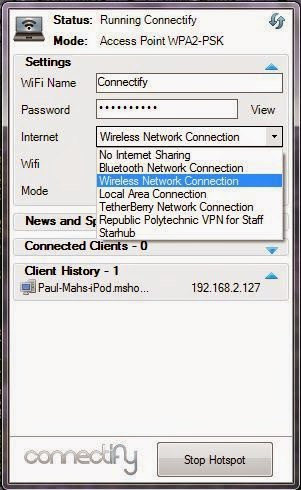
    After making your choice, another menu would pop up from your task bar. It should be similar to the one below.
     It may look different depending on the version downloaded.


     Follow the steps as shown above.

    1.  Type in your desired hotspot name in the Hotspot name box
    2. Choose the internet connection you want to share. In the picture above, we would be sharing the internet connection from Atheros AR9285 Wireless Adapter.
    Click on the Advanced arrow and a menu would drop like the picture below
     Now selected the device to share over and the type of sharing or security mode.
    After selecting your security mode, type in your password below the hotspot name.

        3. then click on the start hotspot button to start the hotspot.
    N.B: You can only run an Ad-hoc with windows versions below Windows 7. Windows 7 and above fully support the access point network.
    You may read The Difference between Access Point and Ad Hoc Network
    You can now connect any wireless device to the hotspot.

    Hope everything goes well. Drop your comments below if u face any difficulty.


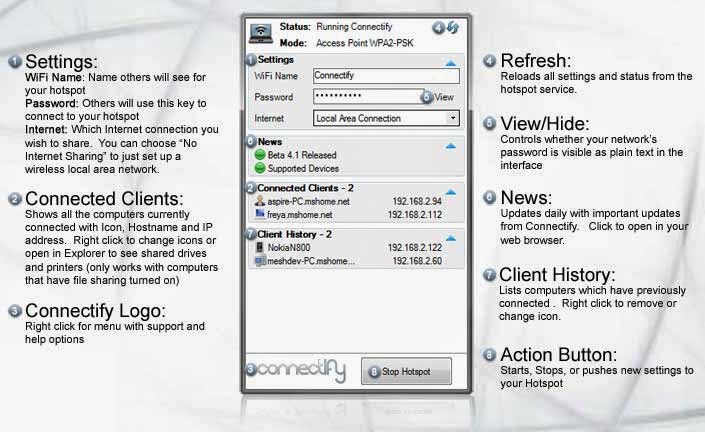
    Basic operations on connectify-me with their meanings.
    19:05 - By Unknown 0

    How to install Connectify

    Download the latest version of connectify here. After downloading open the installer and click agree to proceed with the setup. By default, it would be installed into it's default directory [ i.e. Local Disk (C:)].
    It would take a couple of minutes to install as it would be checking for the availability of important system files like Net Framework. If your machine doesn't have Net Framework installed, don't panic yet. It would download it by itself.
    This is probably the time to grab a cup of coffee whilst you wait for the installation to complete.
    After the installation is done, you would be required to restart to complete the installation.
    17:22 - By Unknown 0

    Latest News

    Blogroll

    Recent news

    Text Widget

    Blogroll

    Discussion

    © 2014 MyBlogger Pro. WP Theme-junkie converted by Bloggertheme9 Published By Gooyaabi Templates
    Powered by Blogger.
    back to top