Powered by Blogger.

Follow us on facebook

Tech Archive

Contact Form

Name

Email *

Message *

Featured Articles

Decoration

All Stories
Showing posts with label Blogging-tips. Show all posts

Wednesday, 2 July 2014

Free Online Google PageRank Check


Check the performance of your website in google using our free google page rank tool.

PageRank Check
Check your website Google PageRank!

URL


Please enter the access code as displayed above.
Access code

Online PageRank Check provide by SEOCentro.
18:27 - By Unknown 0

Free SEO Analyzer tools To Check Website/Blog SEO Performance


This free SEO checker tool can be effectively used to check the performance of your website or blog's performance on search engines. Enter your website or blog's URL into the URL box and enter the Access code into the access code box and hit submit to fully analyze your website or blog. 
SEO Analyzer
Check your SEO status!

example: http://www.example.com.
URL


Please enter the access code as displayed above.
Access code

Online SEO Analyzer provide by SEOCentro.
10:46 - By Unknown 0

Free Meta Tag Analyzer Tools

Meta tags are vital components that can drive immense traffic to a website provided they are properly configured. Many websites suffer from poor traffic from search engines as a result of poor meta tags configuration or no meta tags at all.
This tool is provided freely to analyze your website's meta tags configuration as well as give recommendations on how to fix them..

Meta Tag Analyzer
Check your meta tags!

example: http://www.example.com.
URL

(optional)
User Agent * (optional)


Please enter the access code as displayed above.
Access code

Online Meta Tag Analyzer provide by SEOCentro.
09:59 - By Unknown 1

Thursday, 19 June 2014

How to Restore a Blogger Template Easily


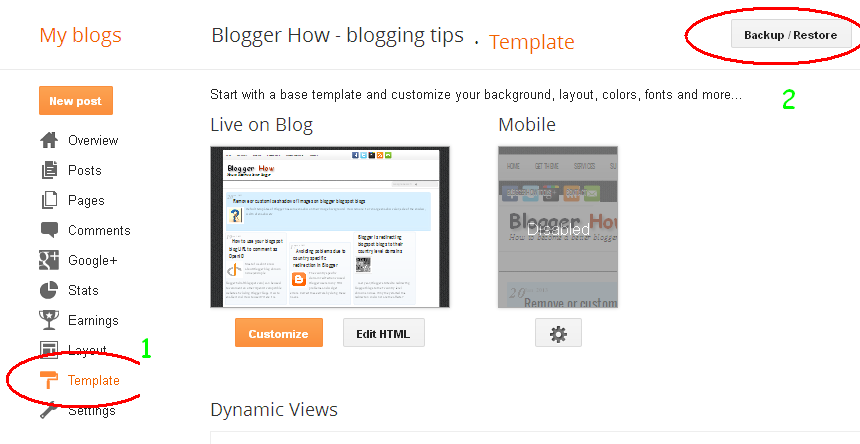
To restore a previously saved template, follow the steps below;
⦁    Login to your blogger account

⦁    Navigate to template section on the left side of page.
⦁    Click on it
⦁    Next click on the Backup / Restore tab on the upper right of page.


⦁    Click browse and navigate to the location of template. It normally ends with the xml extension.
⦁    Select and click on Upload to restore the template.
18:22 - By Unknown 0

How To Enable Search Engines to Crawl your Blog

Search engines are a great source of traffic for websites and blogs. Having them crawl and indexing your blog is definitely going to increase the number of visits to your blog.
   Follow the steps below to backup your blogger template
⦁    Login to your blogger account
⦁    Navigate to Settings section on the left side of page.
⦁    Select Basic and then look out for the Privacy  option
⦁    Click on Edit at the side of "Listed on Blogger. Visible to search engines."
⦁    Tick "Yes" for all of them and click on save changes to Save.
18:11 - By Unknown 0

Latest News

Blogroll

Recent news

Text Widget

Blogroll

Discussion

© 2014 MyBlogger Pro. WP Theme-junkie converted by Bloggertheme9 Published By Gooyaabi Templates
Powered by Blogger.
back to top